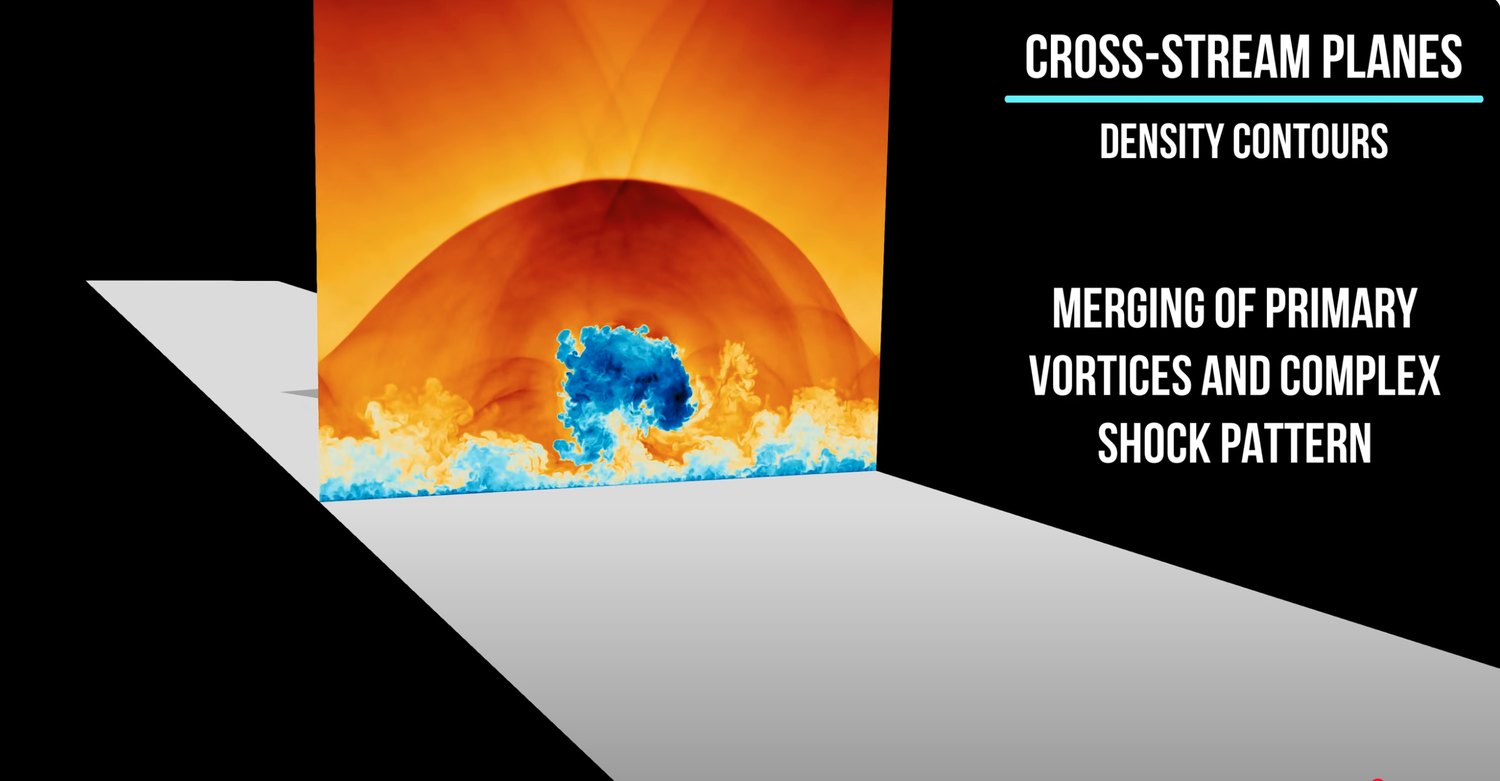
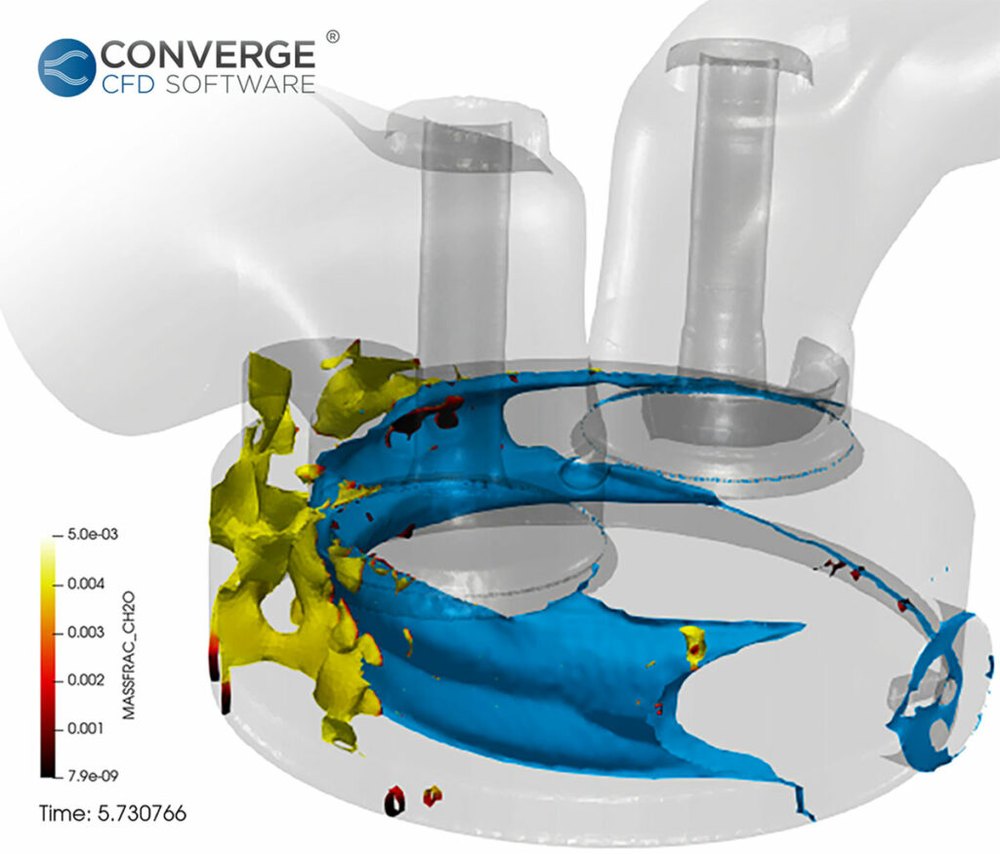
Write it all out, move it, read it back, post-process, and only
then look. That stretch is now most of the distance between a finished run and a
design decision, and it got longer while the solvers got faster.
It is also why a number in a config file says every hundredth
timestep. The filesystem sets the cadence, so what you keep is decided before
anyone has looked at anything.
Why the number in that config file is small: a machine's bandwidth falls away in
steps. On Titan, computation ran at
125 PB/s,
node memory at
4.5 PB/s,
the interconnect at
24 TB/s,
and storage at
1.4 TB/s.
Five orders of magnitude from top to bottom, and post-processing reads from the
bottom.
Moreland, IEEE CG&A 36(2), 2016, Fig. 1
Catalyst removes the middle. Your analysis runs inside the solve,
while the data is still in memory: on the solver's own nodes, streamed to
neighbouring ones, or both, and never by way of the filesystem.
So instead of picking which timesteps to lose, you pick what to
measure, and you get it for every one of them. Nor are you stuck with that
choice: pipelines can be swapped while the solver runs, you can attach a session
and look at something you had not planned for, and what the analysis finds can be
fed back into the solve.
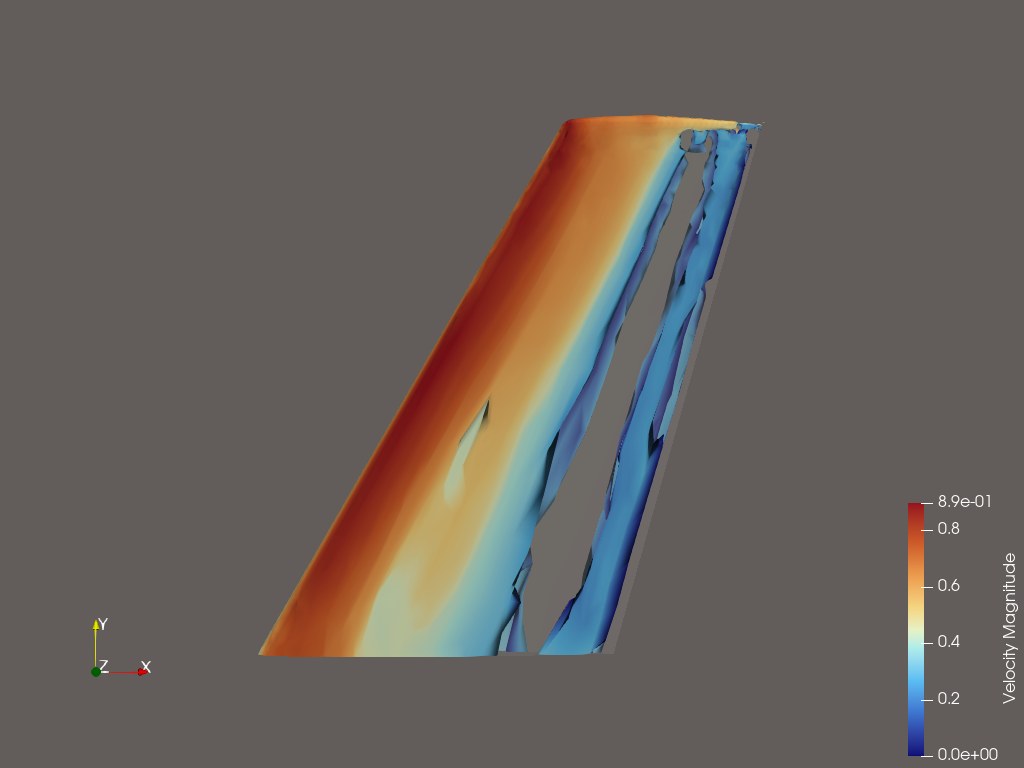
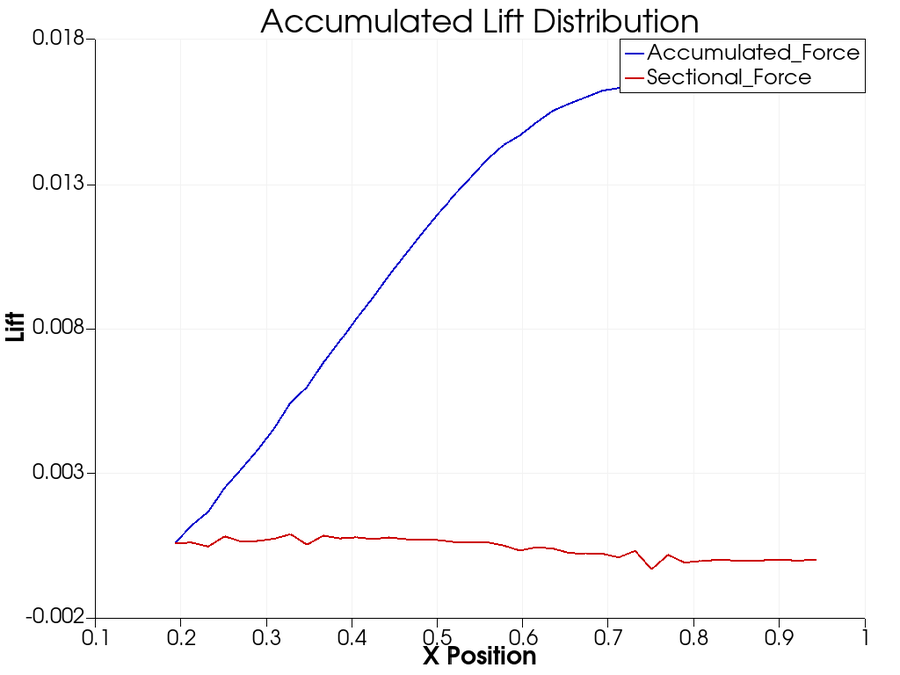
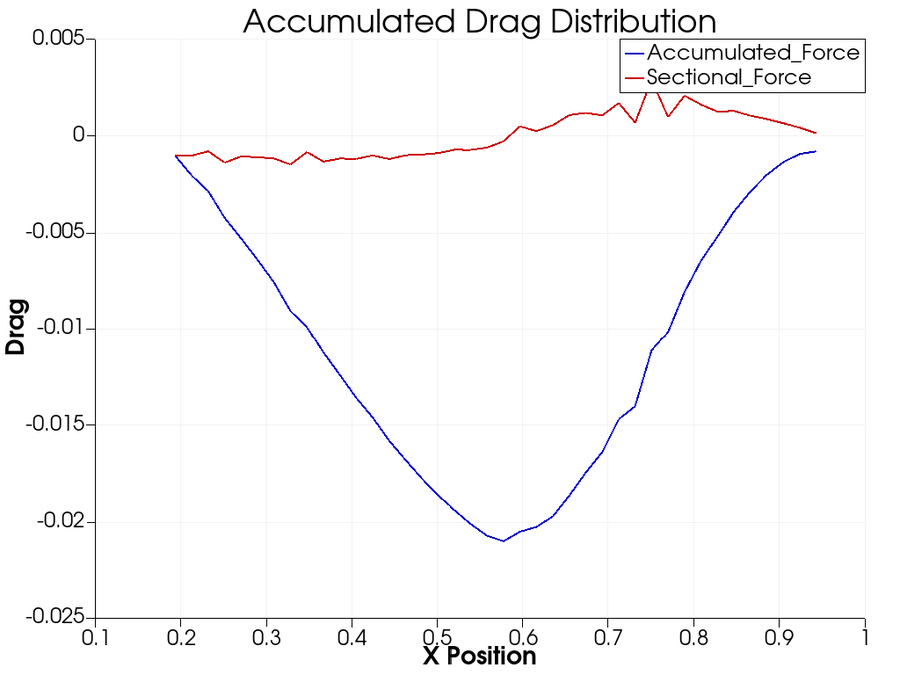
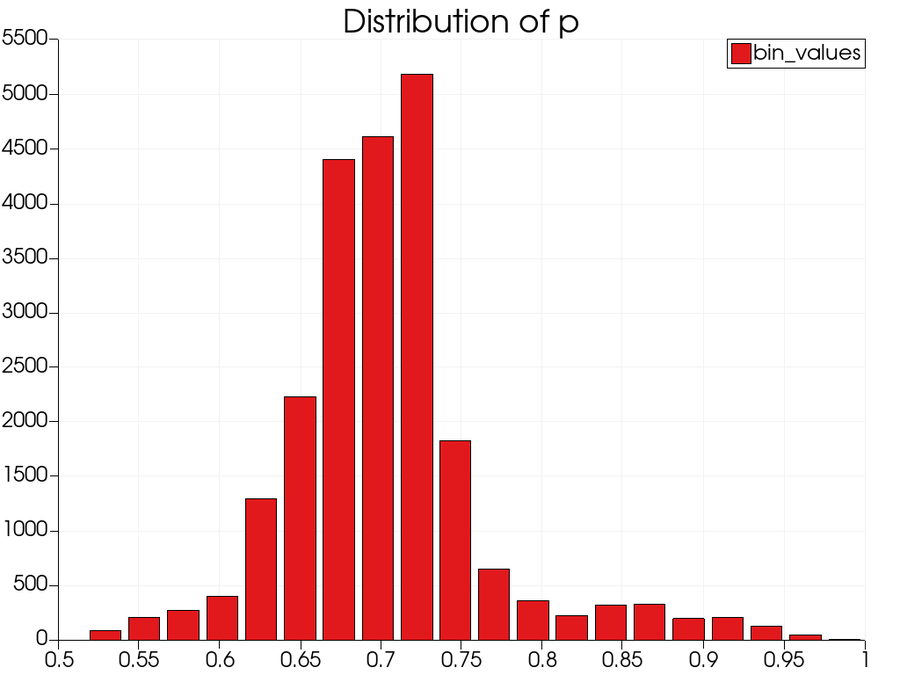
Feature extractionQ-criterion vortex coresEngineering quantitysectional liftEngineering quantitysectional dragStatisticspressure distribution
Four products from one production CFD run, requested in plain
language while it was still solving. Catalyst served
the live simulation to ParaView; trame drew the browser session; an MCP layer
turned the question into filters. No
solution files were written. The same session reads from disk instead,
unchanged, when the run is already over.
Watch the two numbers separate.
A WarpX timestep on Frontier produces a 5.75 billion element mesh,
1.16 TB. Post-hoc, all of it has to land on disk before you can look at any of
it, and then be read back again to do the analysis. In situ, only the results you
asked for are ever written.
Solver produced
0 GB
Written to disk
0 GB
timestep 0 · reduction n/a
· pipeline render one frame + integrate a scalar
Where these numbers come from. The published WarpX timestep is a 5.75 billion
element mesh at 1.16 TB, so N ≈ 1,792 on a side. Twenty
integrated quantities are 160 bytes. A 1920×1080 frame is about
2 MB whatever the mesh size. A slice is N² = 3.2 million
cells, and as data with six fields at single precision that is roughly
0.18 GB. Writing everything is 1.16 TB.
Six orders of magnitude separate the
first from the last, and the choice is yours, not the filesystem's.
Only the last option registers on the lower bar. The other three are drawn as a
marker because at this scale they are a rounding error, which is the entire
argument.
This is not a choice between in situ visualization and
post-processing. You may still write files, still load them in ParaView, still explore
them afterwards. In situ lets you decide what gets extracted and which files, so what lands on disk is your say.
This is long, deliberately, and different readers need different parts of it.
Jump to yours. Nothing below is hidden behind anything else.
The Catalyst API is an ABI-stable C interface. Your solver links
libcatalyst, a small BSD-licensed library with one header. The
ParaView implementation is discovered at run time.
ParaView is not in your build system, not in your dependency tree, and not in
your support matrix.
The same three calls serve all three placements. Whether the pipeline executes
on the solver's ranks, on a separate allocation fed over the network, or splits
the difference by reducing in place and rendering elsewhere, is a launch-time
decision. Your adaptor does not know which one it is feeding.
The solver also does not know what is behind those calls.
The header defines a C API with a stable ABI, and the implementation is a separate
shared library that the loader finds at run time. ParaView Catalyst is the
implementation Kitware builds and supports.
Writing another is possible and rarely necessary, which is the reassuring
part. Kitware Europe built
one over ADIOS2
(ISC 2023);
Fides now does that job inside the ParaView implementation, and the Ascent-backed
one is being retired for want of a gap to fill. Independently implementable, and
converging rather than splintering.
What runs at run time is a Python pipeline, and that is a wider door than it
sounds. Your solver's arrays arrive as NumPy, so NumPy, SciPy, pandas, PyTorch,
scikit-learn, Matplotlib and any wrapped C++ library are all in scope, operating
on live simulation state. Published in-situ training work does exactly this:
vtk_to_numpy on the field, torch.from_numpy, train,
plot the loss, render the prediction against ground truth, all in one script.
The ParaView implementation adds two decades of VTK on top: hundreds of filters,
data reduction and resampling, temporal and unsteady analysis, statistics,
particle tracking and parallel rendering. Or write your own implementation
against the same API. Several groups have, including ADIOS2/Fides staging, a
workflow composer, and a game-engine bridge.
A site that wants none of it ships nothing extra; a site that wants all of it
sets an environment variable.
This is Catalyst 2, and the number matters because the
previous API linked the implementation in. A published survey measured what that
cost a static build: 2.1 MB to
98 MB, replicated per process
(Bauer et al. 2016, Table 2).
Under 2.0 the question does not arise.
A C interface because everything binds to C. There is a worked example for each:
C,
C++,
Fortran 90 and
Python.
Your solver's language is not the question; whether it can describe its mesh is.
Swap implementations at run time with
CATALYST_IMPLEMENTATION_NAME and
CATALYST_IMPLEMENTATION_PATHS; Catalyst loads the named library with
dlopen and checks it for compatibility.
API reference.
No recompile, and pipelines themselves
can be added and
removed while the solver runs.
/* the entire integration surface */
#include <catalyst.h>
// once, at startupcatalyst_initialize(params);
// every timestep: describe the mesh you already have
conduit_node_set_path_external_float64_ptr(
mesh, "fields/pressure/values", p, ncells);
catalyst_execute(params);
// once, at shutdowncatalyst_finalize(params);
Fields are passed by pointer.
Catalyst reads your arrays in place: no copy, no reformat, GPU-resident data
stays on the GPU. A
D2Q9 lattice-Boltzmann
example keeps four field arrays in device memory for the whole run, hands
Catalyst the raw pointers through set_external, and analyses them
on the same buffer the solver just wrote, with no per-step transfer to host.
# the other side: your pipeline script, in Pythonfrom paraview.simple import *
from vtk.util.numpy_support import vtk_to_numpy
import numpy as np, torch
defcatalyst_execute(info):
data = servermanager.Fetch(MergeBlocks(producer))
omega = vtk_to_numpy(data.GetPointData().GetArray("omega"))
# it is just an array now, so do whatever you do
loss = model.train_step(torch.from_numpy(omega).float())
np.save(f"kpi_{info.cycle}.npy", omega.mean(axis=0))
No C++ to write, no rebuild to
change the analysis, and nothing stopping you importing whatever the rest of your
field already uses.
An isosurface tracked through a live AMReX run. The AMR block
structure is the solver's own, read in place, refining as the front moves.
You can start without touching your solver.
This is the part most people do not know about. A file-based adaptor runs the
same pipelines against data already on disk, so an existing archive can be mined
with the analysis you were going to write anyway. No instrumentation, no code
owner to convince, no risk to a binary anyone has validated.
The pipeline is the deliverable, and it does not change. Whatever you develop
and check against last year’s results is the identical script that later
runs inside a live solve. So the evaluation produces the artefact rather than
just an opinion about it.
For most teams this is the honest first step: find out what the
analysis actually tells you, and what it costs, before anyone commits engineering
time to instrumenting a solver.
then what it costs to go further →
Two paths, one pipeline
The same Python, the same filters, the same extracts. What changes is
where the data comes from and when the answer arrives.
Against an archive
Inside the solve
Solver changes
none
three calls, one header
Data source
files you already have
memory, in place
Answer arrives
when you run it
while the run is going
The pipeline
identical
identical
Worth saying plainly because it inverts the usual order:
the evidence comes first and the commitment second.
the examples run either way →
If you sell simulation software, the argument is different.
Your problem isn't the filesystem. It's that post-processing (plots, exports,
derived quantities, comparison tooling, rendering) is a permanent line item on
your roadmap and it never stops asking for headcount.
Catalyst is BSD, so it ships inside your product with no royalty
and no copyleft. See the licence table below.
You stop taking analysis feature requests
Ship one adaptor and the pipeline becomes a Python script. "Can you add this
plot, this export, this derived metric" turns into something your customer
writes for themselves, on their own schedule, without a release from you.
You stop maintaining an analysis stack
Parallel rendering, unstructured meshes and AMR, GPU pipelines, temporal
analysis, statistics, resampling, twenty file formats. That is a quarter
century of work in VTK and ParaView that you can link instead of rebuild, and
keep getting for free as it improves.
You instrument against a stable API
What you instrument against is a documented C API with a stable ABI, and it
has been implemented independently more than once. You are unlikely to want to
do that yourself, and the reason is the reassuring part: the alternatives keep
being absorbed rather than multiplying. If your requirements ever did diverge
from ours, the door is open and someone has walked through it.
New capability without a new release
Pipelines are Python, with the full VTK and ParaView APIs in scope, so a new
extract, plot or derived quantity is a script rather than a build. You can hand
one to a customer mid support cycle without recompiling, without a regression
run, and without disturbing a binary they have already validated. Your
customers can write their own the same way: in the ParaView GUI if they know
it, in Python against VTK if they do not. An extension point rather than a
backlog, for both of you.
Instrument once. All of this follows.
These are not separate products or separate integrations. Each one is a Python
pipeline against the same three calls, chosen at run time. The products span
the same range: rendered frames, integrated engineering quantities, geometric
extracts, explorable databases, training data, trained models, corrections steered
back into the solver, and artifacts small enough to email a collaborator.
That is the part worth sitting with if you ship simulation software. You
instrument once; your users reach all of it without another release from you.
Roughly in the order teams adopt them. All of them run three ways without a
code change: in line,
blocking or async, in
transit on separate nodes, or hybrid,
reducing in place and rendering elsewhere. Fides ships inside ParaView and hands
the Conduit node straight to ADIOS2, so moving off-node is a change to the
pipeline script rather than to your solver.
Which one fits you →
Linked names go to published work using that pattern. Grey ones
are established practice with no public reference we could verify, so we have not
linked them.
The same adaptor feeds all three, and the solver code does not change
between them. Moving from in line to in transit is a few lines in the Python
pipeline: instantiate a Fides writer and give it the Conduit node Catalyst
already holds. ADIOS2 carries it from there.
Why the placement is the decision
These are not three ways of doing the same thing. A machine’s
bandwidth falls away in steps, and each placement reads the data at a different
one. The whole in situ argument is that the analysis should meet the data high on
this ladder rather than at the bottom of it. Titan, from
Moreland, reproduced in the
2016 survey, Fig. 1.
Where the analysis reads from
Bandwidth
Against post hoc
The solver’s own memory, in line
4.5 PB/s
3,200×
The interconnect, in transit
24 TB/s
17×
Storage, after the run
1.4 TB/s
baseline
Computation on that machine ran at 125 PB/s, five orders of
magnitude above storage. That gap is the reason any of this exists. The hybrid path
is the arithmetic taken seriously: reduce at 4.5 PB/s where the data already
sits, then move only the reduction across an interconnect that is 188 times slower
than memory and 17 times faster than disk.
First, measure something
Where almost everyone starts. Cheap, and it pays immediately.
Quantitative KPIs
Lift, drag, boundary-layer metrics, field energy. Engineering numbers at every timestep, not every hundredth.
Arbitrary-order and discontinuous elements travel through as
themselves rather than being projected down to linear first. A public miniapp
builds all six cell types at first or second order, with shape and field
order set separately.
Feature extraction
Isosurfaces, vortex cores, streamlines, thresholds. Keep the structure, discard the volume it came from.
Regression testing
Run the pipeline inside the test suite so a failure arrives with
pictures attached. A bitwise mismatch tells a reviewer that something
changed; a rendered field often tells them what and where.
Live monitoring
See divergence in hour four of a three-day job instead of on
Friday. On a coupled ocean model at roughly 8,000 cores, a rendered frame
exposed a domain-decomposition artifact at the very first coupling step;
in a write-then-look workflow it would have been buried in terabytes,
averaged away, or never written often enough to see.
Change a parameter or boundary condition mid-run through catalyst_results. An on-device reduction returned eight bytes to the driver and the field never left the GPU.
Query a trained model mid-run and return a correction to the
solver, as tightly as every nonlinear iteration: read a feature from the
volume channel, write a closure correction back into solver memory before
the next one begins.
Solvers exchange fields every timestep through a common
in-memory mesh description rather than through disk and bespoke glue. Across
components, instrument the coupler rather than the models: one integration
serves every component, each grid in its native form. Inside one solve, a
model can join the physics, correcting a closure every nonlinear iteration
through catalyst_results. Because the pipeline is Python,
gradients can be taken where the data already is.
catalyst-cosim is being built on this.
Digital twins
Assimilate live telemetry, steer the model to track the asset, stay faster than real time using surrogates.
Ensembles and DoE
Hundreds of runs where full-field output per member is impossible. Extract quantities of interest at full temporal fidelity instead.
Adaptive sampling
Feed those summaries to an optimiser that decides where in the design space to run next.
And where post-hoc stops being an option
The cases that motivated all of this in the first place.
Runs whose per-timestep output exceeds what the filesystem can absorb. The analysis goes to the data, on the same nodes or adjacent ones, because the data cannot go to the analysis.
Chain and orchestrate several of the above as modular stages in one run.
A model is only as useful as what it can reach.
Point a language model at a finished run and it can read the files somebody
already decided to write, at the cadence somebody already chose. It can summarise
them. It cannot ask for the extract nobody planned, cannot see the timestep that
was skipped, and cannot change anything.
A Catalyst session is a different proposition. The model gets a live handle on
the run: it can request a quantity that was not in the original pipeline, watch a
trace form, add or remove a pipeline stage, and hand a value back to the solver.
Asking a question in plain language is one use of that, and not the most
interesting one.
What it can do with that handle. Explain what a result
means and where it came from. Steer: change a boundary condition or a closure
coefficient from what the analysis just found. Catch the thing a log would never
show: a field drifting out of physical bounds, a decomposition artefact printed
across a coupling interface, an integrated quantity going the wrong way. Adjust
what is being kept, so an extract that turns out to matter starts being written
from timestep four hundred rather than never. Choose where the next ensemble member
should sit. All of it through the same three calls.
The objection is trust, and the architecture answers it rather than asking for
faith. The model interprets and plans; deterministic ParaView filters do the
computing; it never writes the analysis code. A domain ontology constrains
planning to valid analysis chains, so whole classes of failure disappear by
construction: no hallucinated API calls, no silently missing pipeline stage, no
script that runs cleanly and returns the wrong number.
In practice that is a browser: extract, steer and monitor a live simulation
from one, with a scalable pvserver backend carrying it to production-scale
data.
The same session works either way. Catalyst serves the running solver when there
is one; the identical pipeline reads files when the run is already finished. The
engineer asks the same question and does not need to know which mode they are in,
so adopting this does not mean abandoning the analyses you already have.
Two packages build on the same substrate: catalyst-ml for
in situ training and inference, and catalyst-cosim for multi-physics
coupling. Kitware is extending this with NASA and the University of Colorado
Boulder, so validated solvers gain modern AI workflows without being rewritten.
roadmap →
// intent, execution and explanation stay separate
engineer → LLM plans (constrained by ontology)→ MCP
→ ParaView filters (deterministic)→ Catalyst (the live solver)→ LLM explains what came back
One measured piece of it
The ablation locates the ontology's effect precisely: it does not change
which tools get selected, which was already reliable. It corrects how results
are read.
Measure
Without ontology
With ontology
Interpretation accuracy
0.41
0.91
What it looks like running
A surrogate model inferring the flow while the solver runs, from
EDF Lab's work on deep learning surrogates.
use case →
The same stream, for training
Surrogates and reduced-order models
train on the same runtime stream, with no disk round trip and GPU-resident data
staying on the GPU, so training keeps pace with the solver instead of throttling
it.
Somebody already did the hard part.
Every capability above is running in production, at scale, in codes you have
heard of, on machines you can name. Every number and every name on this page
links to its source: a paper, a lab report, or the adaptor's own code. Where
we cannot link it, we say so. Those links open in a new tab, so you can check one
without losing your place here.
Across CFD, combustion, shock physics, plasma, climate, biomedical,
rotorcraft and astrophysics, in national labs, national weather services,
universities and commercial products.
And on the machines that matter: the runs behind this page's numbers executed
on Frontier,
Titan,
Cielo and
Beskow.
workstation to exascale on the same three calls.
Every linked name goes straight to its evidence: a paper, a lab
report, or the adaptor source. Dashed ones are integrations we know of and could
not verify in public. We would rather show you the gap than fill it with
something you cannot check.
Some of these integrations began on the 1.0 API, before 2021.
Read that as durability rather than staleness: these teams have been running in
situ analysis through more than one machine generation and more than one version
of the library. Moving an adaptor forward is small when it happens, and LULESH
got shorter doing it, from 325 lines to 155.
The papers below are the ones to read before committing engineering time. Every
entry links to its DOI or an open-access copy.
Much of this predates the current API, and that is the point. Catalyst 2
arrived with ParaView 5.9 in 2021; the work before it is a decade of
independent evidence that analysing data in memory holds up, at scale, across
domains, on machines that no longer exist. The
older papers make the case for in situ. The current API is what you would
actually build against. Tagged below so you can tell which is which, and so
that nothing a 1.0 paper says about build complexity or binary size gets mistaken
for a description of Catalyst today.
Citing Catalyst
Cite the AIAA 2026 paper for current capability, the 2021 ISC paper for the
API itself, and the 2015 ISAV paper for the original design. If you publish
work that uses Catalyst, tell us, and we will add it.
Extracts are smaller, not free. An isosurface can land almost entirely on a
handful of ranks, and that imbalance defeats ordinary collective writes. Read
this before assuming reduction ends the conversation.
The honest answer depends on your pipeline, and nobody can give it to you
without knowing it. But the published cost studies do narrow it down, and the
reasoning is worth having before you talk to anyone, including us.
Integrating a quantity of interest, thresholding, extracting a surface on a
modest mesh. These cost a fraction of a timestep.
Yes → run it in line. Sandia's conclusion after
10.58M processor-hours: for analysis that does not hinder solver scalability,
in situ is the simplest and best choice, because the analysis costs less than
allocating extra nodes and moving data to them.
Oldfield et al., ICS 2014
02Does your analysis scale as well as your solver?
Parallel image compositing is the usual culprit. It is communication-bound,
and it degrades at high concurrency in a way the physics does not.
No → move it in transit. Rendering at lower
concurrency on dedicated nodes was measured at 4× cheaper for volume rendering
and 3–6× for isosurfacing. This is the fix for the compositing wall, not a
reason to avoid in situ.
Kress et al., ISC HPC 2020
03Are you scaling up, or already at the top end?
In-line visualization cost grew from 0.6× to 2.2× of solver cycle time across
8 to 1024 nodes on the same problem, while data transfer cost barely moved.
Scaling up → the case for in transit strengthens as you
grow. With one caveat from Sandia: in transit only pays if the compute
nodes have enough work to hide the analysis. At 32K cores with too little work
per node, the wait time erased the benefit.
Kress 2020 · Oldfield 2014
04Should the pipeline block the solver, or not?
Since 2.1, catalyst_execute can snapshot the timestep onto a
bounded queue and return immediately, while a worker thread runs the pipeline
alongside the next solver step.
Depends on the ratio of pipeline cost to step cost. A
couple of reductions per step gains little and should stay synchronous. A
heavier pipeline gains a lot. In the 2.1 demonstration the solver went from
blocked 33% of wall-clock to 6%, completing 27% more
iterations. GPU solvers usually leave CPU cores idle, which is exactly what
async is for. The trade is bounded memory for the queue.
Catalyst 2.1 demonstration, 2026
05Can you say in advance what you will need to see?
The genuine constraint is narrower than it first looks. The data is
transient, so a timestep you let pass is gone. What runs at any moment,
though, is changeable.
Not entirely → then do not try to. Swap pipelines
while the solver runs; attach a live session and look at something you had not
planned for; steer the solve from what the analysis finds; render an image
database across many viewpoints and explore it afterwards; trigger on a
detected feature; or write reduced extracts for post hoc work. Catalyst
supports batch and interactive simultaneously, so the practical question is
only what to run first.
Moreland, IEEE CG&A 2016
06Is your filesystem actually keeping up today?
Measure it rather than assume. Time how long one timestep takes to land, and
what fraction of a solver cycle that is. For plenty of sites the answer is
still that the filesystem copes.
If yes → keep post-processing, and use in situ to choose
what you keep. In situ is additive; nothing here asks you to stop writing
files. For context rather than as a benchmark: Sandia measured post-processing
performing well on Cielo in 2014, with a strong Lustre
filesystem and one moderate analysis every ten cycles, and concluded that all
three approaches were needed. That machine was retired in 2016 and the
compute-to-storage ratio has widened by orders of magnitude since, so read it
as the direction of travel rather than as a current answer.
Oldfield et al., ICS 2014
07What are you actually optimising for?
Cost per run, time to answer, and capability you do not currently have are
three different goals with three different answers.
Capability is usually the real one. Most teams do not adopt
in situ to save money on storage. They adopt it because there is an analysis
they cannot do at all: training data that was deleted at write time, a
divergence nobody saw until Friday, an ensemble too large to keep. If that is
your case, the cost comparison matters less than you think.
our read of the adoption corpus, not a published finding
Compare on the field’s own axes, not ours.
In 2020 more than fifty people from across this field spent a year agreeing on
how to describe in situ systems, because the words had stopped meaning the same
thing to everyone. The result is
a six-axis terminology and a survey of
fifteen systems against it. If you are comparing anything, start there rather
than here.
Open copy.
ParaView Catalyst has a row in that table. Two of its five entries read
differently today, and both moved the same way.
Catalyst’s row, then and now
Proximity and division of execution moved together: once analysis
can run off node, it can be given its own resources. Both are additions
rather than swaps, and the hybrid path uses both at once, reducing on the
solver’s own ranks and rendering on dedicated ones in the same run. In
2020 that combination belonged to the data-management frameworks; a dedicated
analysis API doing it is the change. Integration type stays where it was, and
deliberately so: the API has been implemented independently, but the
alternatives have been absorbed rather than multiplying, so calling it a
shared protocol would overstate what happened.
hybrid measurement ·
async and GPU
Axis
2020 survey
Today
Integration type
Dedicated API
Dedicated API
Proximity
On node
On node and off node
Access
Direct, shallow copy where possible
Direct, shallow copy, including device memory
Division of execution
Time division
Time and space division
Operation controls
Automatic non-adaptive; human in the loop, blocking and non-blocking
Unchanged, and already the most complete entry in that column
Two things the taxonomy has no axis for
Worth asking anyway, of anything you are considering.
Operation controls describe who chooses what runs. They do not
describe results going back the other way, into the solver, tightly enough to
correct a closure every nonlinear iteration.
The others are real, and one of them is underneath us
That survey covers fifteen systems properly, so read it rather than us on this.
In short: Ascent is the sibling, shipped alongside Catalyst by
the same ECP programme and built for a smaller dependency footprint.
SENSEI is a layer above rather than a rival and can drive
Catalyst underneath. libsim is the same idea in
VisIt’s ecosystem; the argument between them is which application your
scientists already have open. ADIOS2 is not an alternative at
all, it is the transport our off-node path runs on.
ECP ALPINE covers the first properly.
Writing your own is a legitimate choice for one stable
analysis you fully understand. The survey calls this Bespoke and is fair about
it: minimal effort, minimal reuse. It stops being cheap at the second analysis,
at the first GPU, when a result needs to come back into the solve, or when the
person who wrote it leaves.
What it actually costs to adopt.
Effort scales with mesh complexity, not with how much analysis you want.
A structured-mesh adaptor is a few hundred lines. Unstructured with AMR is more.
Once the adaptor exists, every pipeline your users will ever want is a Python
script they write themselves, with no further solver changes.
The cheapest first step costs nothing in solver changes at all. Point a
file-based adaptor at data you already have, write the pipeline you actually
want, and find out what it costs and what it tells you before anyone touches the
solver. If it earns its place, the same pipeline moves inside the run.
The clearest number we have, and note what it measures: this is
the cost of moving an existing 1.0 adaptor to the 2.0 API, not the cost of
starting from nothing. Converting LULESH cut it roughly in half. The
tutorial walks it in
six stages, from an uninstrumented solver to a steered one. Read it before
estimating your own.
On runtime cost, be careful what you compare against. A solve with
nothing attached is a floor, not an option. You still have to get the data out.
The real comparison is the whole post-hoc pipeline: write every timestep, move it,
read it back, then post-process. Amortised over a run, in situ usually wins by a
lot.
But it depends entirely on what you ask the session to do. Catalyst
costs whatever your pipeline costs, however often you run it. Integrating a
quantity of interest is close to free. Rendering 4K volumes every timestep is not.
Nobody should tell you the answer without knowing your pipeline.
One code, one conversion, measured and published: the LULESH proxy moved
from the legacy API to Catalyst 2. It is the cost of porting an adaptor you
already have, not of writing one from scratch. Source:
Ayachit et al., Catalyst Revised, ISC High
Performance 2021.
LULESH adaptor
Legacy API
Catalyst 2
Lines of code
325
155
Headers to include
13
1
Build system change
CMake conversion required
two variables in the Makefile
ParaView SDK at build time
required
not required
Swapping the implementation
rebuild
environment variable
LULESH: the 325-to-155-line conversion above, running.
use case →
The PLUTO adaptor was written by one
graduate student for a code with no official Catalyst support: polar grid,
zero-copy field passing, 273 lines, and a generator script to emit it. They then
published
a walkthrough so others could repeat it.
What drives the runtime cost
Four things, roughly in order of how much they matter. Tune
the first two and most workloads land where you want them.
1What the pipeline computes
A scalar integral over the field is nearly free. Isosurface extraction is
modest. Volume rendering at high resolution is a real cost, and should be
budgeted like one.
2How often it runs
Every timestep is a choice, not a requirement. Most teams run the expensive
parts on a stride and the cheap KPIs every step.
3Mesh conversion
Translating your native domain into the Conduit Mesh Blueprint is typically
the most expensive part of the adaptor itself. Fields can be passed by
pointer; topology usually cannot.
4Where the data already is
GPU-resident data that stays on the GPU avoids the transfer entirely. Data
that has to be marshalled across the bus does not.
BSD 3-Clause. Ship it in your product.
Catalyst and ParaView are both BSD 3-Clause. Redistribute inside a commercial
product, royalty free, with no copyleft obligation and no per-seat licence.
Ask us for the full transitive dependency list in writing, because legal review
usually wants it, and we would rather send it up front.
Component
Licence
Catalyst (the stub you link)
BSD 3-Clause
ParaView implementation
BSD 3-Clause
VTK
BSD 3-Clause
Conduit
BSD 3-Clause
Or have the people who wrote it do the integration.
Kitware develops ParaView and Catalyst, and has maintained them for a quarter
century. That is worth exactly as much as what you do with them.
The library is the easy part. It is free, it is BSD, and plenty of teams
instrument their own solver without ever talking to us; a graduate student did
PLUTO in 273 lines. What takes longer to learn is the rest: which pipeline
answers your question, what it costs at your concurrency, where it stops scaling,
and what to keep when you cannot keep everything. That knowledge lives in
somebody's process, not in a header file.
So start with a bounded piece of work rather than an open-ended project.
Every engagement begins with the assessment, so you get an
architecture and an effort estimate before committing to the larger work.
Integration assessment
We review your solver's data structures and parallel decomposition, then
deliver an adaptor architecture, an effort estimate in engineer-weeks, and the
performance risks worth knowing about first.
fixed fee · 2–3 weeks · written deliverable
Adaptor implementation
We write the adaptor against your build, upstream it if you want it
upstreamed, and hand over with your engineers able to maintain it.
fixed scope, priced from the assessment
Support subscription
Named response commitment, version-migration help, and priority on fixes that
block your release. For teams shipping Catalyst inside a product.
The same repository this page has been linking to all the way down. Clone it and
run the integration patterns described here: sync and async execution, GPU device pointers,
closed-loop steering, dynamic pipelines, high-order and discontinuous elements,
adaptors in four languages.
Start with the LULESH tutorial if you want the graduated path, the
LBM cylinder if you want all three GPU patterns at once, or
the CellGrid miniapp
if your elements are high-order: it builds hex, tet, wedge, pyramid, quad and
triangle cells in one run, at first or second order, with shape and field order
set independently.
git clone https://gitlab.kitware.com/paraview/catalyst-examples
cd catalyst-examples/ParaView/Lulesh-tutorial# six versions, uninstrumented through steered
ls
Version0 Version1 Version2 Version3 Version4 Version5
A prebuilt container is on the way
for a zero-build first look. Until then the examples build against an installed
ParaView, and the tutorial's first version needs no Catalyst at all.